
1. Project Introduction
Managing an e-commerce catalog with thousands of computer parts, dynamic specifications, warranty matrices, and multi-tier pricing is notoriously complex.
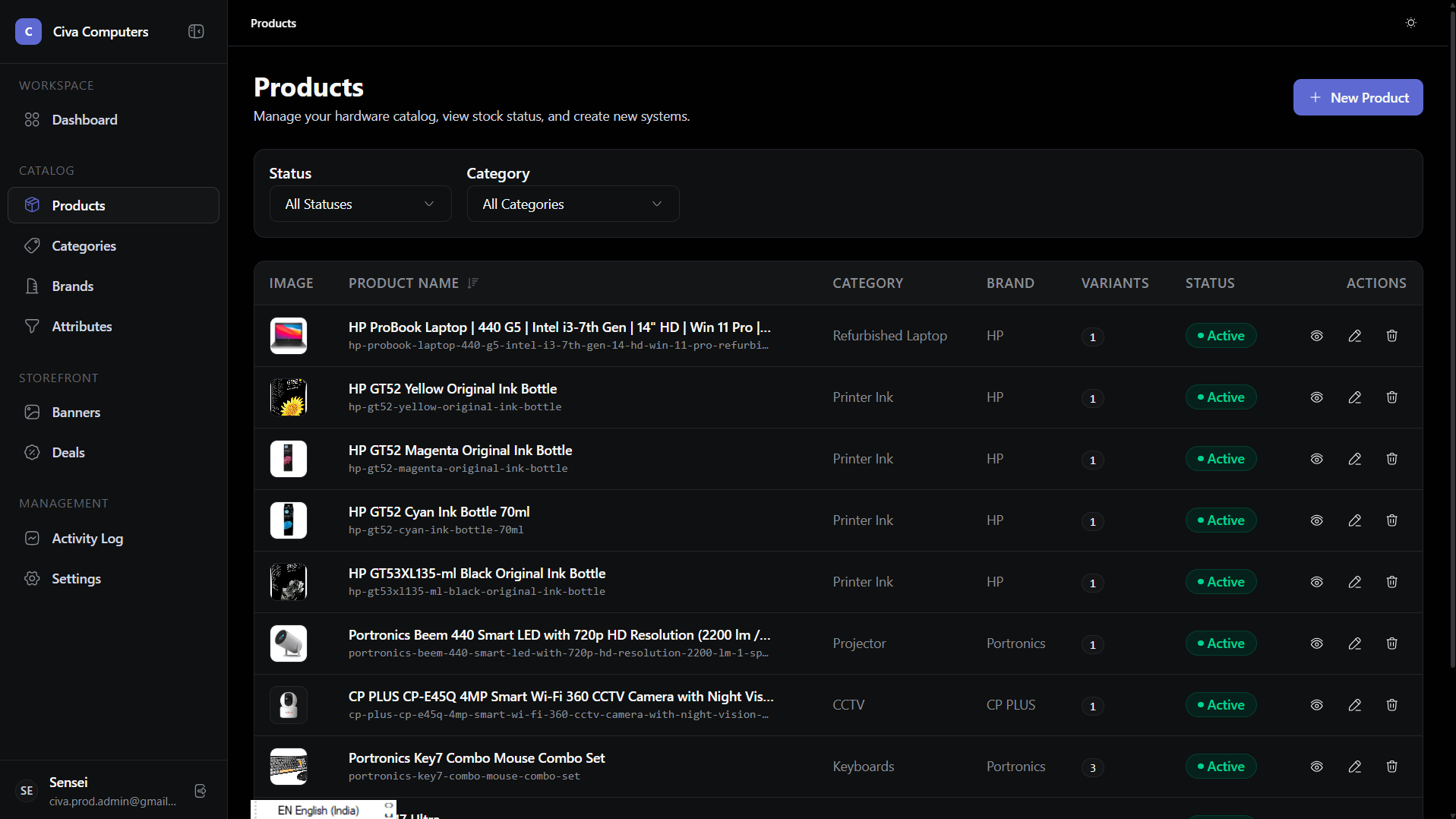
The Admin Dashboard is a focused Single Page Application (SPA) designed exclusively for catalog managers and operations teams. Built with React 19 and Vite, it delivers an instant, zero-page-refresh workspace optimized for data density and error-free catalog mutations.
Project:      CIVA Operations Dashboard
Role:         Frontend Architecture, UI/UX, Multi-Step State Engine & Diffs
Stack:        React 19, Vite, TanStack Table, Tailwind CSS
Status:       Active Build / Staging
2. The Situation
Before building this custom dashboard, store managers were juggling spreadsheets and a clunky off-the-shelf admin template.
Adding a single new laptop model required manually calculating every variant combination in Excel, creating eight separate database entries by hand, and hoping nobody made a typo in the SKU format or price column.
When an error occurred, there was zero audit history. Nobody knew which team member edited a price or deleted an image asset.
3. The Problem
Catalog management has unique operational challenges:
- Massive Input Overload: A complete product entry requires up to 40 distinct parameters (identities, SEO tags, category specifications, uploaded media assets, variant options, pricing tiers, and warehouse stock thresholds). Putting all of this on one long form causes severe user fatigue and frequent missed validation errors.
- Matrix Recalculation Destroys Data: When a manager finishes typing prices for eight variations and realizes they forgot one attribute option (like an additional colorway), naive array recalculations wipe out all eight rows of manual pricing work.
- Accountability & Audit Trails: Every price drop, stock adjustment, and draft edit needs an immutable visual diff history.
4. My First Assumption
I initially assumed I could build the admin dashboard directly inside our Next.js App Router repository under a private /(admin) route group.
I thought: "Keeping everything in one Next.js project will save time and let us share UI components."
5. What I Discovered
That initial monolithic assumption quickly caused severe development friction:
- Conflicting Rendering Models: Admin dashboards don't need SEO or server-side pre-rendering. They need dense data tables, persistent websocket connections, and complex local modal state. Next.js server components introduced awkward hydration boundaries and unnecessary SSR overhead.
- Build Bottlenecks: Every time a designer adjusted a customer storefront CSS style, the entire admin build pipeline had to re-run.
- Security Surface Area: Combining public client components and private administrative forms in one repo increased the risk of leaking internal routes or environment secrets.
6. The Turning Point
I decided to split the admin dashboard into a standalone Vite + React 19 SPA (civa-admin).
Vite gave us instant 50ms hot-module replacement and pure client-side SPA execution. We could use dense table virtualization, sticky columns, and complex multi-step modal workflows without fighting server-side lifecycle rules.
Monolithic Next.js Admin:    Slow hot-reloads, awkward SSR boundaries, shared security risk.
Standalone Vite SPA:         Instant 50ms HMR, zero SSR overhead, clean security perimeter.
7. Decisions & Experiments
The 7-Step Stage-Gated Product Wizard
Instead of a daunting 40-field scrolling form, we built ProductWizardModal as a 7-step assembly line:
- Basic Info: Name, auto-slug generation, brand, warranty terms.
- Media Gallery: Multi-image uploads with primary cover reordering.
- Category Specifications: Pulling required attributes linked to the selected category.
- Variant Options: Selecting multi-option dimensions (RAM, Storage, Color).
- Variant Matrix Configuration: Generating combination tables with price and stock inputs.
- Variant Image Mapping: Assigning specific uploaded photos to individual variants.
- Review & Validation: Final cross-step schema verification before atomic submission.
Each step operates as an independent validation gate, preventing users from advancing until current fields pass schema constraints.
Virtual DOM Reconciliation for Variant Matrices
To prevent naive matrix regeneration from wiping user-entered prices, we implemented a deterministic composite key system (attributeId:optionId). When options change, the matrix generator looks up existing keys and preserves all previously entered prices, custom SKUs, and inventory numbers.
8. What Didn't Work
1. Auto-Saving Dirty Modal State on Dismiss
In an early prototype, we added a helper that auto-synced uncommitted drafts when a user clicked outside the modal. This created a subtle bug where clicking "Cancel" secretly saved half-filled garbage data and triggered unwanted activity logs. We rewrote the handler to ensure Cancel is a strict zero-side-effect wipe.
2. Monolithic Form State in a Single Redux Store
We initially attempted to store all wizard steps in a giant global Redux slice. Updating a single input in step 5 triggered re-renders across the entire modal. We replaced it with isolated step-level form state and a lightweight context orchestrator.
9. The Final Solution
The final dashboard provides an operations environment inspired by modern developer tools:
- Dark Workspace Foundation: Slate base (
#0B0F17) with crisp typographic contrast for high data density. - Activity Audit Diff Inspector: A visual change viewer showing before-and-after diffs for every catalog mutation.
- TanStack Virtualized Tables: Fast client-side sorting, column filtering, and bulk selection across thousands of records.
10. Result
- Zero Input Loss: Managers can add or remove variant attributes at any stage without losing pricing data.
- 100% Audit Coverage: Every create, edit, or status toggle records an immutable user timestamp and field diff.
- Fast Workflow: Catalog creation times dropped from multi-tab manual entry to a structured 3-minute flow.
11. What I Learned
Internal tools deserve the same design rigor as customer-facing products.
When an operational interface is confusing, the business pays for it in human error, corrupted catalog data, and lost time. Designing deterministic forms and clear audit trails turned a frustrating chore into a reliable, confident workflow.